

In the realm of computer networking, especially within the scope of IP routing, understanding how routers make decisions about forwarding packets is fundamental. One of the core components that enable routers to perform this task efficiently is the IP routing table. This table functions as a navigational chart, directing the router on the appropriate path to forward incoming data packets according to their destination IP addresses.
This guide aims to demystify the concept of IP routing tables, delve into their structure and functioning, and provide a clear, step-by-step approach to understanding how routers utilize them to ensure data reaches its intended destination accurately and efficiently.
1. What is an IP Routing Table?
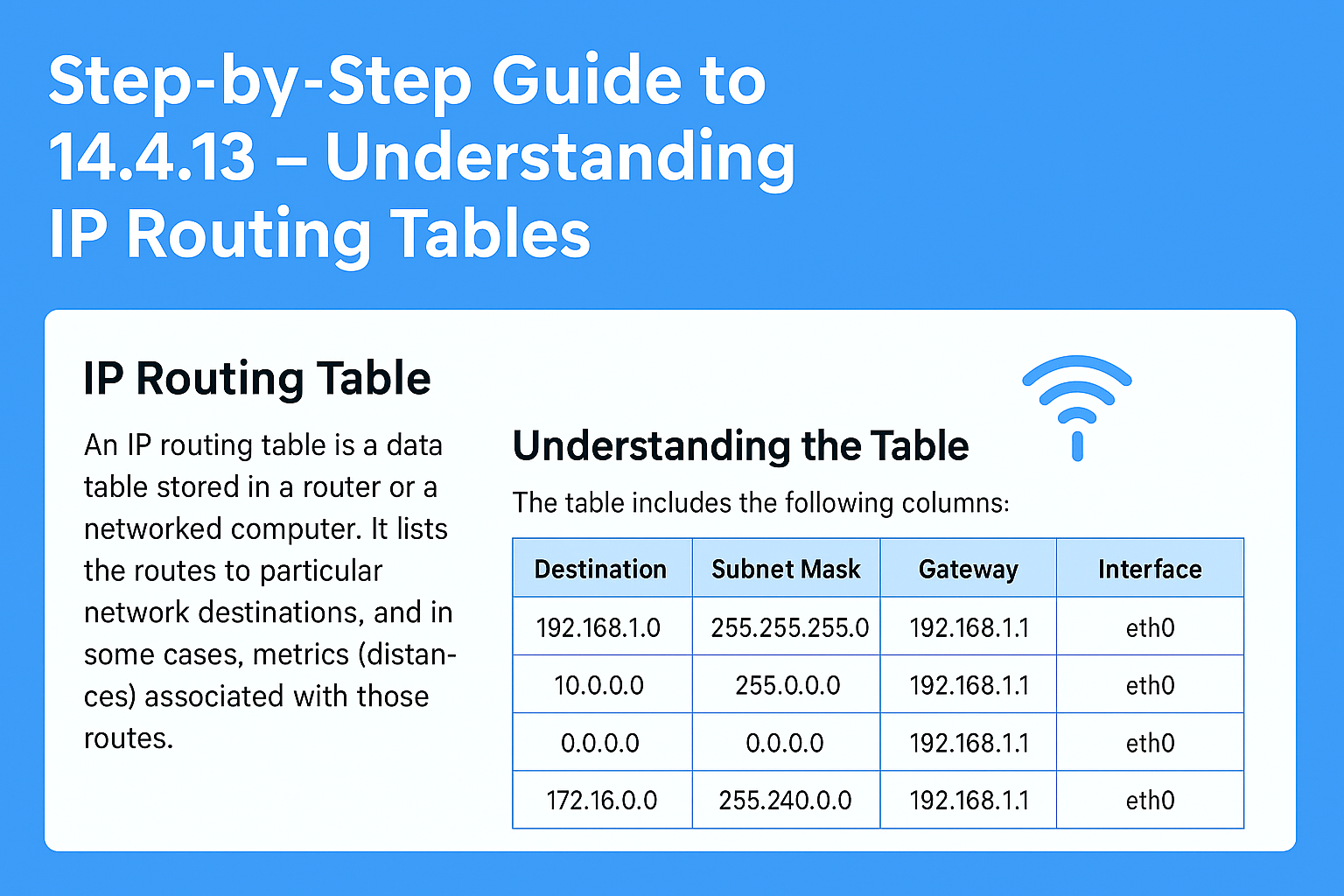
An IP routing table is a database maintained by a router that contains information about network paths to various IP destinations. It determines the best route for forwarding packets based on destination IP addresses.
Think of it as a GPS system for your data packets, where each entry in the table indicates a route, including the destination network, subnet mask, next-hop address, interface, and other vital information.
2. Components of an IP Routing Table
Before diving into how routing tables work, let’s familiarize ourselves with their typical components:
- Destination Network: The IP address or network prefix the route is associated with.
- Subnet Mask: Defines the network portion of the IP address.
- Next-Hop Address: The IP address of the subsequent device, whether a router or host, that the packet needs to be forwarded to on its journey.
- Interface: The physical or virtual connection point on the router through which the packet is transmitted.
- Administrative Distance: A numerical rating used to show how reliable a route is, where smaller values represent higher trust.
- Metric: A value that quantifies the cost of using that route (e.g., hop count, bandwidth).
3. Types of Routing Table Entries
Routing tables can contain various types of routes:
- Connected Routes: Directly connected networks to the router interfaces.
- Static Routes: Manually configured routes.
- Dynamic Routes: Routes learned via routing protocols (e.g., OSPF, EIGRP, BGP).
- Default Route: A fallback path the router relies on to send packets whenever no precise route exists for the target IP address.
4. How Routers Use Routing Tables
Upon receiving a packet, the router checks the destination IP address and looks through its routing table to identify the most suitable match for directing the packet to its destination.The process involves:
- Longest Prefix Match: The router selects the most detailed route by comparing the destination IP with the route that has the longest subnet mask.
- Route Selection: When several routes apply, the router picks the one with the longest prefix, meaning the most specific match.
- Forwarding: The action of transmitting a packet via the chosen interface toward the next hop along its path to the destination.
5. Step-by-Step Breakdown of Routing Table Lookup
Let’s now examine the process in detail:
Step 1: Receive the Packet
The router receives an IP packet with a destination IP address.
Step 2: Extract Destination IP
The router extracts the destination IP address from the packet header to determine where the packet should be forwarded.
Step 3: Search the Routing Table
The router searches its routing table for entries that match the destination IP address, starting with the most specific subnet mask.
Step 4: Find the Best Match
The router applies the longest prefix match rule, selecting the route with the most specific subnet mask that corresponds to the destination IP.
Step 5: Determine Next Hop and Interface
Once the best route is identified, the router determines the next-hop IP address and selects the appropriate interface to forward the packet toward its destination.
Step 6: Forward the Packet
The packet is sent out through the specified interface towards the next hop, continuing through the network until it reaches the destination.
6. Viewing the Routing Table
Administrators and network engineers can view routing tables using command-line interface (CLI) commands. For example:
- Cisco IOS:
show ip route - Juniper Junos:
show route - Linux/Unix:
ip routeorroute -n
These commands display the current routing table, including all active routes, their types, and associated metrics.
7. Practical Examples
Example 1: Static Route Entry
Suppose your router has a static route:
Destination Network: 192.168.1.0/24
Next Hop: 10.0.0.2
Interface: GigabitEthernet0/1When a packet destined for 192.168.1.15 arrives, the router matches the destination with this route and forwards the packet via GigabitEthernet0/1 to 10.0.0.2.
Example 2: Dynamic Routing Protocol
If the router learns a route via OSPF:
Destination Network: 10.0.0.0/8
Next Hop: 192.168.0.1
Interface: GigabitEthernet0/0The router adds this route to its table and uses it for forwarding relevant packets.
8. Common Routing Table Challenges and Troubleshooting
- Incorrect Routes: Can cause packets to be misrouted or dropped.
- Route Conflicts: Multiple routes to the same destination; selecting the best route depends on metrics and administrative distance.
- Route Expiry or Flapping: Dynamic routes may fluctuate due to network instability.
Troubleshooting involves verifying routing table entries, checking route priorities, and ensuring routing protocols are functioning correctly.
9. Summary
- The IP routing table is a critical component that guides data forwarding in a network.
- It contains entries for static, connected, and dynamic routes.
- Routers use the longest prefix match to select the most specific and thus the optimal route for forwarding a packet.
- Proper understanding and management of routing tables are vital for network stability and performance.
Final Thoughts
Mastering the understanding of IP routing tables is essential for anyone involved in network design, management, or troubleshooting, as it enables effective decision-making and efficient data forwarding within a network. By grasping how routers interpret and utilize routing information, network professionals can optimize traffic flow, enhance security, and ensure reliable communication across complex networks.
Whether you’re a beginner or an experienced engineer, regularly reviewing and analyzing routing tables will deepen your understanding of network behavior and help you become more proficient in managing network infrastructure.
